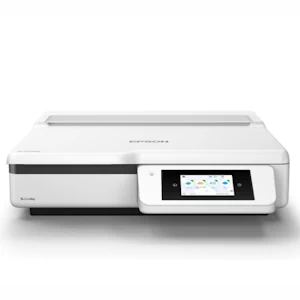
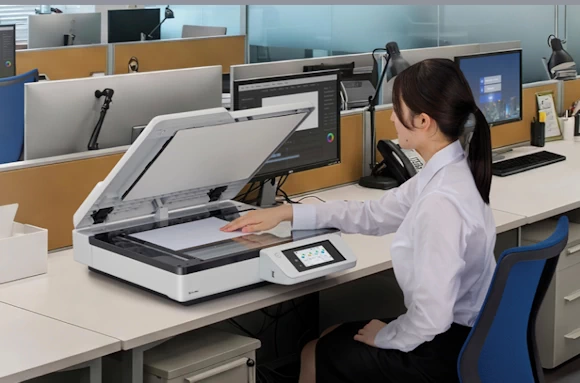
The ds-51000wn,ds-61000wn and the ds-71000wn shown.
Experience expanded possibilities in document capture and sharing with the DS-51000WN, engineered for modern workgroups. From the best-selling scanner brand in the U.S., this A3 flatbed scanner combines strong performance with built-in full network connectivity and high-quality color scanning to support efficient workflows across a wide range of media—from oversized documents and bound materials to photos and everyday paperwork. The spacious 11'' x 17'' flatbed makes it easy to capture oversized and other specialty media, while smart scanning modes allow you to digitize books and photos with confidence. TWAIN and ISIS® drivers enable seamless integration into existing document management systems. An intuitive 4.3'' color touchscreen and ScanWay™ PC-free functionality make everyday operation easy, enabling direct scanning to a USB flash drive, email, network folders or online storage accounts—no computer or software installation required. The DS-51000WN gives you the control and flexibility to work with diverse media across multiple applications, creating a connected workflow that’s built for today’s evolving business needs.
Features of the DS-51000WN Network flatbed scanner
Capture large, 2-sided documents in a single scan — scans documents as small as 2.7" x 4.7" up to 11.7" via the flatbed
Boost productivity: built-in Wireless, Ethernet and USB connectivity allow for easy workgroup sharing
includes TWAIN and ISIS® drivers for easy integration with nearly any document management system and other
solutions across industries
Book Mode automatically captures each page when placed on the flatbed, eliminating repeated lid handling or button presses; Photo Mode enhances images with color restoration and auto exposure
Intuitive, large 4.3" LCD touchscreen provides easy access to user-defined jobs, settings and maintenance
Take advantage of convenient, network scanning capabilities — use the optional networking module and included Document Capture Pro software to scan to any PC on the local network
scan directly to a USB drive1, network folders2, emails2 or online
storage accounts3 without a computer
OCR: included Epson Document Capture4 software creates job profiles and document workflows; generates searchable PDFs or editable Microsoft® Office files5; and supports scanning to online storage accounts such as
Dropbox®, SharePoint® and Google Drive™6
Scan Beyond the PC: works with Epson Smart Panel®7 (iOS® and Android®) and Mopria® Scan (Android only)8 apps,
as well as scanning to Chromebook®
Use with Windows or Mac® — includes TWAIN and ISIS drivers and offers fast Hi-Speed USB connectivity for quick, easy setup
The dimensions are 21.9" wide x 23.8" deep x 6" high, and weighs 24.5 lb. The scan area is 11.7" x 17"
1 USB device maximum capacity of 2TB (formatted in FAT®, FAT32 or exFAT®). Devices with security settings (such as password or encryption), or those requiring a dedicated driver cannot be used. |
2 Network connection is required. | 3 Internet connection is required. | 4 Epson Document Capture Pro software for Windows only; Epson Document Capture for Mac only. | 5 Word, Excel® and
PowerPoint® for Windows only; Word and Excel for Mac only. | 6 With Epson Document Capture software installed on the connected Windows PC or Mac. Internet connection is required. All listed
services available on Windows PC installation; Google Drive available for Mac installation. | 7 Requires Epson Smart Panel app download. Data usage fees may apply. | 8 Chromebook scanning supported with the native ChromeOS™ Scan app (ChromeOS version 136 or later required). |9 With Epson Document Capture software installed on the connected Windows PC or Mac. Internet connection is required. All listed services available on Windows PC installation; Google Drive™ available for Mac installation. | 10 Requires Epson Smart Panel® app download. Data usage fees may apply. | 11 Chromebook® scanning supported with the native ChromeOS™ Scan app (ChromeOS version 136 or later required). |